MCP security is the set of controls that decide what AI tools can do through the Model Context Protocol (MCP). MCP lets AI applications such as Claude, ChatGPT and Cursor call external tools and data sources. Because the model chooses which tools to call and reads whatever those tools return, the main risks are over-permissioned access, hidden instructions in tool descriptions and results, tools that change after approval, unapproved servers, and no record of what happened.
In short: MCP is safe enough for enterprise use when identity, permissions, approvals and logging are enforced outside the model, on every tool call. The protocol alone doesn't do that for you. This guide covers the eight biggest MCP security risks, what the current specification does and doesn't cover, the controls enterprises use, a 10-point checklist for getting a blocked rollout approved, and a 90-day rollout plan.
Last updated November 2026.
MCP can be used securely, but it is not secure by default. The protocol defines how AI clients and servers talk to each other, and its specification says authorization is optional, so each server decides how much to protect. The MCP project does publish security best practices that cover known attacks, including confused deputy attacks, token passthrough and server-side request forgery. Whether a deployment is secure depends on how servers, clients and permissions are configured, and on whether anyone is watching.
The OWASP MCP Top 10, which is still in beta, gives security teams a shared vocabulary for these risks. Its entries include token mismanagement and secret exposure (MCP01), privilege escalation via scope creep (MCP02), tool poisoning (MCP03), prompt injection via contextual payloads (MCP06), lack of audit and telemetry (MCP08) and shadow MCP servers (MCP09).
Many MCP servers run on one shared API key or an admin-scoped token, so every user and agent gets the same broad access. OWASP lists this under token mismanagement (MCP01), scope creep (MCP02) and insufficient authentication and authorization (MCP07). The MCP specification's own guidance warns that broad scopes granted up front enlarge the damage when a token leaks.
Control: per-user identity through SSO, least-privilege scopes, and permissions inherited from the source system. With Credal, every call is tied to an individual user through SAML/SSO and SCIM, and permissions are inherited and continuously synced from source systems, so a user cannot do through an agent what they couldn't already do in the system itself.
Any text an agent reads, such as a ticket, web page or GitHub issue, can contain instructions. In May 2025, Invariant Labs showed that a malicious issue in a public GitHub repository could hijack an agent connected to the GitHub MCP server and make it copy data from the owner's private repositories into a public pull request. The researchers noted that this was not a flaw in the GitHub MCP server code itself, which is why patching the server doesn't fix the problem. OWASP lists the class as prompt injection via contextual payloads (MCP06).
Control: treat all tool output as untrusted, and add value-level rules that block the action even if the model is fooled. Credal's Action Parameters can lock a field tied to identity, such as the sender's email or user ID, to a fixed value or inject the user's identity automatically, so the model doesn't control it. Approvals and action gates add a second check before sensitive writes. See action release gates.
Malicious instructions can be hidden in a tool's name, description or parameters. The model reads them when the tool list loads, before the user asks anything, and users usually never see them. OWASP lists it as MCP03. The Cloud Security Alliance's AI Safety Initiative cites the MCPTox benchmark, which reported an average attack success rate of 36.5% across the models tested, and up to 72.8% for the most vulnerable one.
Control: review tool definitions before approval, keep new tools off by default, and expose each team only the tools it needs. Credal lets admins scope servers, tools and actions to users, groups or calling agents, so a model only ever sees the tools approved for that person.
In a rug pull, a tool passes review and is changed afterwards. In tool shadowing, one server's tool descriptions change how the model uses tools on other, trusted servers, even if the attacker's tools are never called. The CSA's May 2026 whitepaper on MCP tool poisoning and rug pull attacks describes both, and notes that MCP clients do not verify that tool schemas stay constant between sessions.
Control: keep a hash baseline of approved tool definitions and check it each session, pause any tool whose definition changes until it is reviewed, and isolate servers from each other. When you evaluate any gateway, ask directly how it detects changes to a tool after approval.
An MCP proxy server that mishandles OAuth consent can let an attacker obtain tokens without the user's approval. A server that accepts tokens that weren't issued for it, and forwards them downstream, lets attackers bypass controls and muddies the audit trail. The specification is explicit: MCP servers must validate that access tokens were issued for them and must not accept or pass on any other tokens.
Control: use servers and gateways that follow the specification's authorization guidance, including audience validation and per-client consent, and never allow token passthrough.
Employees connect any server they find, and malicious servers do circulate: the CSA describes the postmark-mcp npm package, from September 2025, as the first confirmed malicious MCP server in a public package registry. OWASP covers this as shadow MCP servers (MCP09) and software supply chain attacks (MCP04). For the wider problem, see how to stop shadow AI.
Control: a central registry, with clients able to reach only approved servers. See why enterprises need a centralized MCP registry and how Credal's Agent Registry gives every agent a named owner, approval chain, version history and access policy.
Sensitive records flow back through tool results into external models and logs, and an agent with broad access can over-share data it never needed. OWASP calls this context injection and over-sharing (MCP10).
Control: scope data access to what each task needs, apply data loss prevention to responses, and agree data retention terms with model providers.
Each server logs differently, if at all, so nobody can say which agent changed what, or for whom. OWASP lists lack of audit and telemetry as MCP08. The CSA's whitepaper cites a survey in which only 28% of organizations could trace agent actions back to a responsible principal.
Control: one log of every call, tied to a person and an agent, exported to your SIEM. Credal's consolidated logs cover every surface, record the user, agent, server, tool, inputs, outputs and approval decisions, and export natively to Splunk and through OpenTelemetry. See our guide to AI audit logs.
The current version of the specification is 2026-07-28, released on July 28, 2026. It sets out this baseline:
The specification's security best practices cover confused deputy attacks, token passthrough, SSRF, state handle hijacking, local server compromise, OAuth URL validation, mix-up attacks, localhost redirect impersonation and scope minimization. They are focused on authorization and transport. They do not decide which tools your company allows, what values an agent may send, which actions need approval, what data must be redacted, or what you log. Those are your controls, and they have to be enforced somewhere the model can't override.
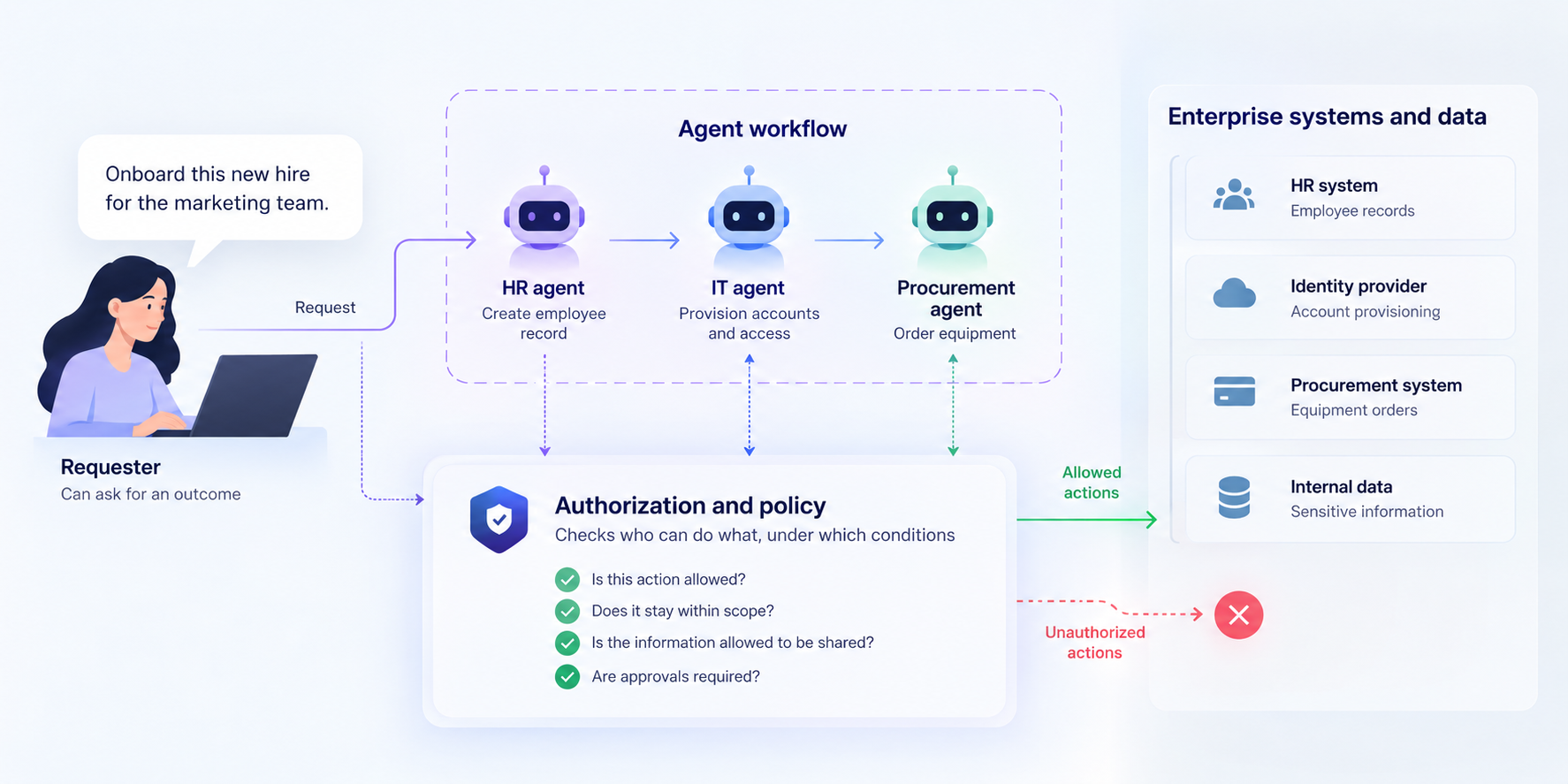
The core principle: don't rely on the model to follow the rules. Models can be tricked by the text they read. Controls should be enforced on every call, outside the model, so a fooled agent still can't exceed its limits.
Doing this server by server doesn't scale. An MCP gateway applies the same identity, policy and logging to every server and every AI client in one place. See how the options compare in our guide to the best MCP gateways for enterprises.
Security teams usually unblock MCP when they can see these ten things. Use this checklist for your review:
Remote MCP servers are safe only when you know who operates them and what they can do. Ask four questions before approving one: who runs it and what is their security posture; how does it authenticate users; which scopes and tools does it expose; and how does it handle changes to tool definitions. A server hosted by a system's own vendor is a different risk from an unvetted community server. Salesforce, for example, made its hosted MCP servers generally available in April 2026 and says every transaction runs as the authenticated user, with existing permissions applied and servers off until enabled. Treat unvetted servers like any third-party software that can read and write company data. Local servers need extra care, because they run with the same privileges as the client.
An API gateway protects your APIs from any caller. MCP security covers what AI agents do with those APIs on a person's behalf, including risks such as tool poisoning that don't exist in ordinary API traffic. Most enterprises need both. For the detailed comparison, see MCP vs API security.
This section describes Credal's product. Credal is the MCP gateway and agent builder for enterprise AI. Every tool call from Claude, ChatGPT, Cursor, Slack or your own apps passes through one governed layer, so the controls above apply the same way everywhere. What Credal emphasizes:
See how Credal's MCP gateway works, read the AI agent security capabilities to require, or get a demo to see these controls running against your own stack.
MCP security is the set of controls that govern what AI tools can do through the Model Context Protocol: who they act as, which tools they can call, what values they can send, and what gets logged.
Over-permissioned access and shared credentials, prompt injection through tool results, tool poisoning, tools that change after approval, confused deputy and token passthrough flaws, unapproved or malicious servers, data leakage through tool responses, and missing audit trails.
Tool poisoning is a form of indirect prompt injection in which malicious instructions are hidden in a tool's description or parameters. The model reads them when it loads the tool list, so the attack can run before the user asks for anything.
An agent reads text from a tool result, such as a ticket, web page or issue, and the text contains instructions. The model may follow them, using the agent's access to read or change other data. Defenses include treating tool output as untrusted and enforcing limits outside the model.
The protocol can be used securely, but it isn't secure by default. Authorization is optional in the specification, and security depends on how servers, clients and permissions are configured.
Use per-user OAuth through SSO, validate token audience, never pass tokens through to downstream APIs, request least-privilege scopes, treat tool output as untrusted, monitor tool definitions for changes, and log every call.
No. Authorization is optional in the specification. For HTTP-based servers, the specification says implementations should follow its OAuth 2.1-based flow, and enterprises should require it.
An MCP gateway sits between AI clients and MCP servers. It checks identity, tool access and values on every call, applies approvals, and keeps one audit log, so the same rules apply across every server and AI client.
The OWASP MCP Top 10 is a list of the most critical security risks in MCP deployments, including token mismanagement, privilege escalation, tool poisoning, prompt injection, lack of audit and shadow MCP servers. The project is still in beta, so check the current list.
API security assumes a predictable client and structured payloads. MCP clients are language models that choose tools at runtime, and tool descriptions and results are natural language that can carry attacks. Enterprises need API controls and MCP-specific controls together.
MCP makes it easy for AI tools to reach business systems, and that's exactly why it needs controls. Put identity, approvals, value limits and logging in a layer the model can't override, start with read-only access, and expand by team. The ten-point checklist above is the fastest way to get a blocked rollout moving again. Credal is the MCP gateway and agent builder for enterprise AI.

One platform for all agents. Full visibility for admins, full access for teams.

One platform for all agents.
Full visibility for admins, full access for teams.