n8n is a workflow automation platform that lets teams connect apps and automate processes with a visual builder, and drop into code when they need to. It is source-available under the Sustainable Use License (n8n's fair-code license), you can self-host it, and it includes AI agent nodes for LLM-driven steps. Teams use it to automate work across HR, IT, finance, sales and support. It is fast and flexible. For enterprises, the open questions are governance: per-user permissions, approvals, audit trails and security patching.
This guide covers what n8n is, what it is used for, how it works, its pros and cons, how secure it is for enterprise use, and how it pairs with an agent platform for multi-agent orchestration.
n8n was founded in 2019 as an alternative to Zapier and Make, which made it easy to connect SaaS products but left gaps some teams hit as volume and customization needs grow: vendor lock-in, limited customization for proprietary systems, and costs that climb with execution volume. n8n addresses these with an open design:
Teams use n8n to automate business processes that span several tools. Common examples:
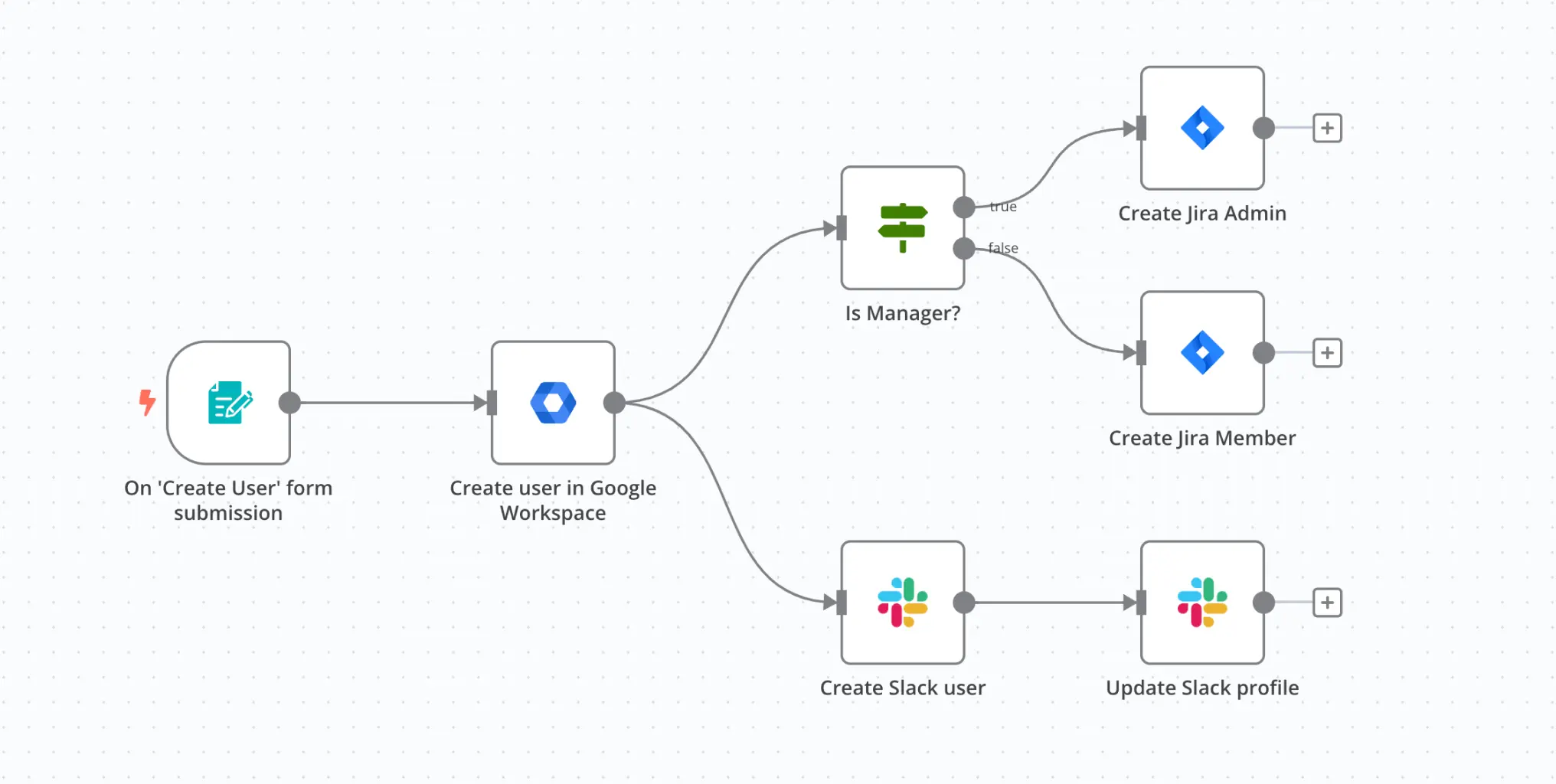
n8n is built around nodes, discrete components that each perform one action. Data passes between nodes as structured JSON, so developers can see the full state at every step.
n8n's published benchmarks report up to 220 workflow executions per second on a single instance, for a simple webhook workflow on a small instance. Its queue mode (a main process, parallel workers and a Redis queue) scales out for heavier workloads. SQLite is used for development, and PostgreSQL is recommended for production.
Yes. n8n is now positioned as an AI-first automation tool. It has nodes for summarization, document processing and embeddings, an AI agent node built on LangChain, and MCP support in both directions: an MCP Client Tool node that lets an agent call tools on an external MCP server, and an MCP Server Trigger node that exposes n8n workflows as tools other AI clients can call.
The agents are best at lightweight decisions inside a flow, such as classifying a ticket or picking a branch. Deeper, open-ended reasoning, where an agent keeps researching until it is confident, is outside what a node-based workflow engine is designed for. n8n does let you nest agents: its AI Agent Tool node lets one agent call other agents as tools, in multiple layers. But you design that orchestration node by node, and there is no central registry where agents are discovered and governed.
It can be, with the right setup, but treat it like any internet-facing automation platform that holds credentials to your systems. In January 2026, researchers disclosed a critical vulnerability (CVE-2026-21858, rated CVSS 10.0), an arbitrary file read in form-based workflows that can be chained into remote code execution. It affected versions before 1.121.0, and n8n fixed it in 1.121.0, released November 18, 2025. Several related flaws were disclosed around the same time. See n8n's security advisory and reporting on the vulnerability. It is a reminder that self-hosted instances must be patched promptly, so run a current release.
Beyond patching, the governance questions security teams ask are only partly answered by n8n out of the box:
A common pattern is to route AI tool access through an MCP gateway for identity, permissions and logging, and keep a central registry to prevent agent sprawl.
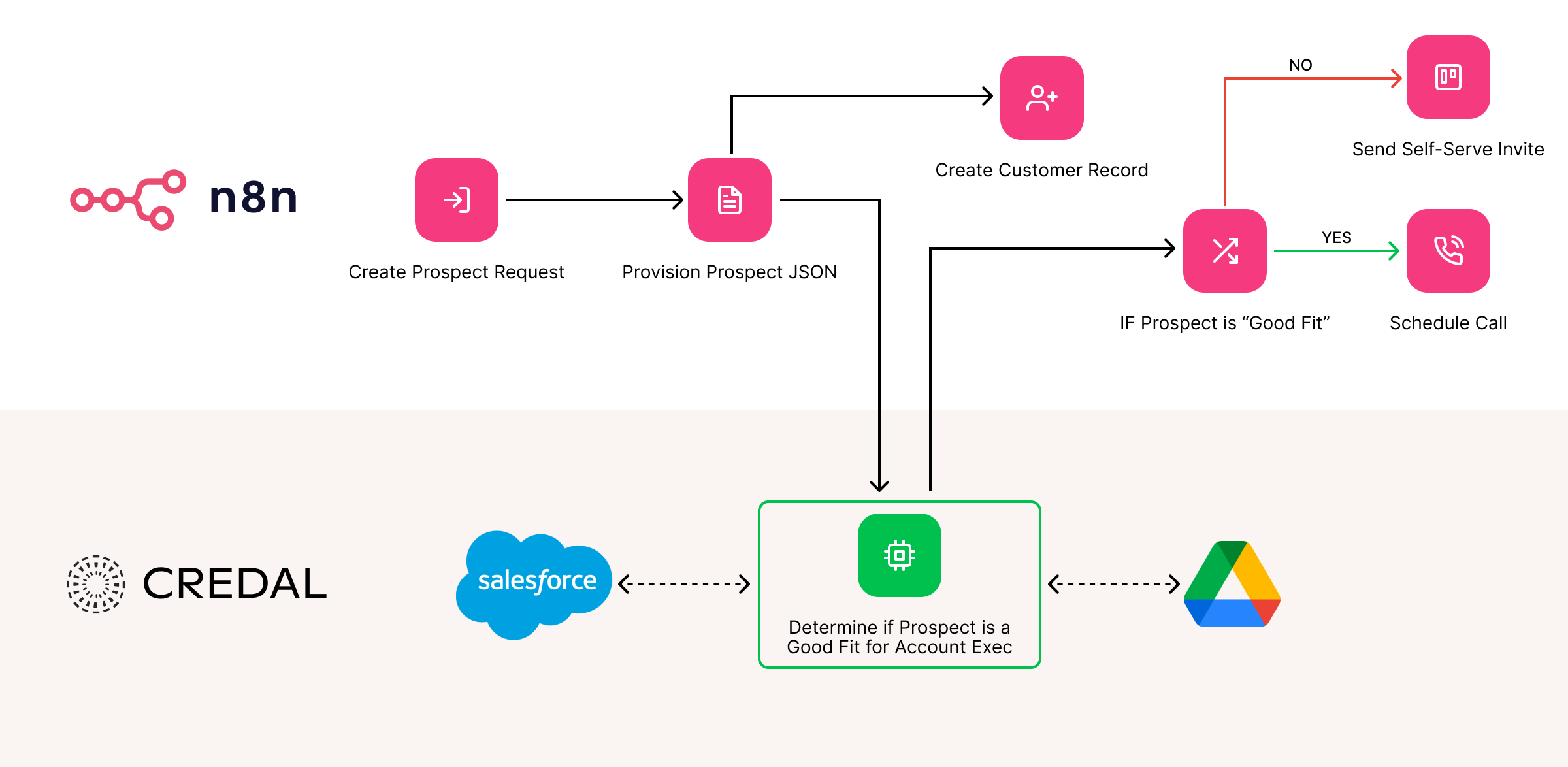
Disclosure: we build Credal, and Credal pairs with n8n. n8n and an agent platform solve different problems, so they pair well. n8n executes deterministic workflows quickly. Credal's Agent Builder handles open-ended reasoning, where agents research across Salesforce, Google Drive, Confluence and usage data until they reach a confident answer, with governed access through the MCP Platform. By analogy, n8n is the hands and the agent platform is the brain.
For example, an orchestrator agent could delegate to a Salesforce agent and an analytics agent to judge whether a customer is at risk of churn. If so, it triggers an n8n workflow to send a re-engagement email. If not, the workflow sends an upsell message.
One caution applies whenever several agents cooperate: an agent can pass along data from its memory that another agent's user isn't allowed to see. Guardrails against that need to exist in whichever system coordinates the agents. See our guide to multi-agent platforms for what to look for, or get a demo to see how Credal handles it.
n8n is a tool for connecting apps and automating tasks by building visual workflows. When something happens in one tool, n8n can run a series of steps across others, including AI steps.
Automating business processes such as employee onboarding, support ticket routing, security alert enrichment, sales and marketing outreach, and turning natural-language requests into API calls.
n8n uses the Sustainable Use License (fair-code): it is free to self-host for internal business use, but it is not an OSI-approved open source license, and you cannot resell it as a hosted service. Some enterprise features are in paid plans, so read the license terms for your use case.
Pros: no lock-in, self-hosting, flexibility, speed and AI nodes. Cons: it is a workflow engine rather than an agent platform, multi-agent orchestration and governance are limited, and self-hosting adds operational and security responsibility.
Yes, n8n has an AI Agent node and can call MCP servers, but agents run as steps inside a workflow. For open-ended, multi-agent work with central governance, teams often add a dedicated agent platform.
n8n can nest agents using the AI Agent Tool node, but it has no registry where agents are discovered and governed centrally. That layer usually comes from a multi-agent orchestration platform.
Yes for many workflow automation needs, if you patch promptly, restrict access and add controls for identity, approvals and audit logging. n8n offers human review for tool calls and paid-plan features such as SSO and log streaming, so check which plan includes what and what compliance reports the vendor can provide.
Keep an inventory of workflows and agents with a named owner for each, route AI tool access through a central gateway, use group-based access instead of shared credentials, and review logs regularly.

One platform for all agents. Full visibility for admins, full access for teams.

One platform for all agents.
Full visibility for admins, full access for teams.